Article
Jun 28, 2026
Analyse Email Marketing Data With Klaviyo MCP + Claude
Last reviewed:

Ejaz Ahmed, Founder, AI Marketing Foundry. Published 28 June 2026. Last reviewed 31 August 2026.
The Time I Used This to Help a Friend
A friend called me in a bit of a panic. One of his clients was threatening to leave - said the email marketing wasn't performing - and he had a call in a few hours to make the case for why they should stay. He needed numbers. He needed a business case. And he needed it fast.
I jumped in.
The client was a fashion label running two separate Klaviyo accounts - one for their local market, one for international - each with its own currency and 12 months of campaign history. Reconciling that manually would have taken most of the day. Exporting CSVs, normalising currencies, pulling campaign reports one by one.
Instead, I connected both accounts to Claude via the Klaviyo MCP. Set up a new project, ran a quick test to confirm the tool calls were working, gave Claude the context - what we were looking for, what needed to be aggregated, what the objective was. About 10 minutes later, we had the full picture across 70-plus campaigns and five flows.
I verified the numbers myself, checked for currency discrepancies, and validated the totals against the source data. What came back was strong:
Average open rate of 47% across all campaigns, roughly double the benchmark we normally see in the sector
Automated flows generating revenue even during periods they were switched off - a sign of what a properly maintained programme could do
A 12-month return of 5.5x: every pound spent on email came back as five and a half
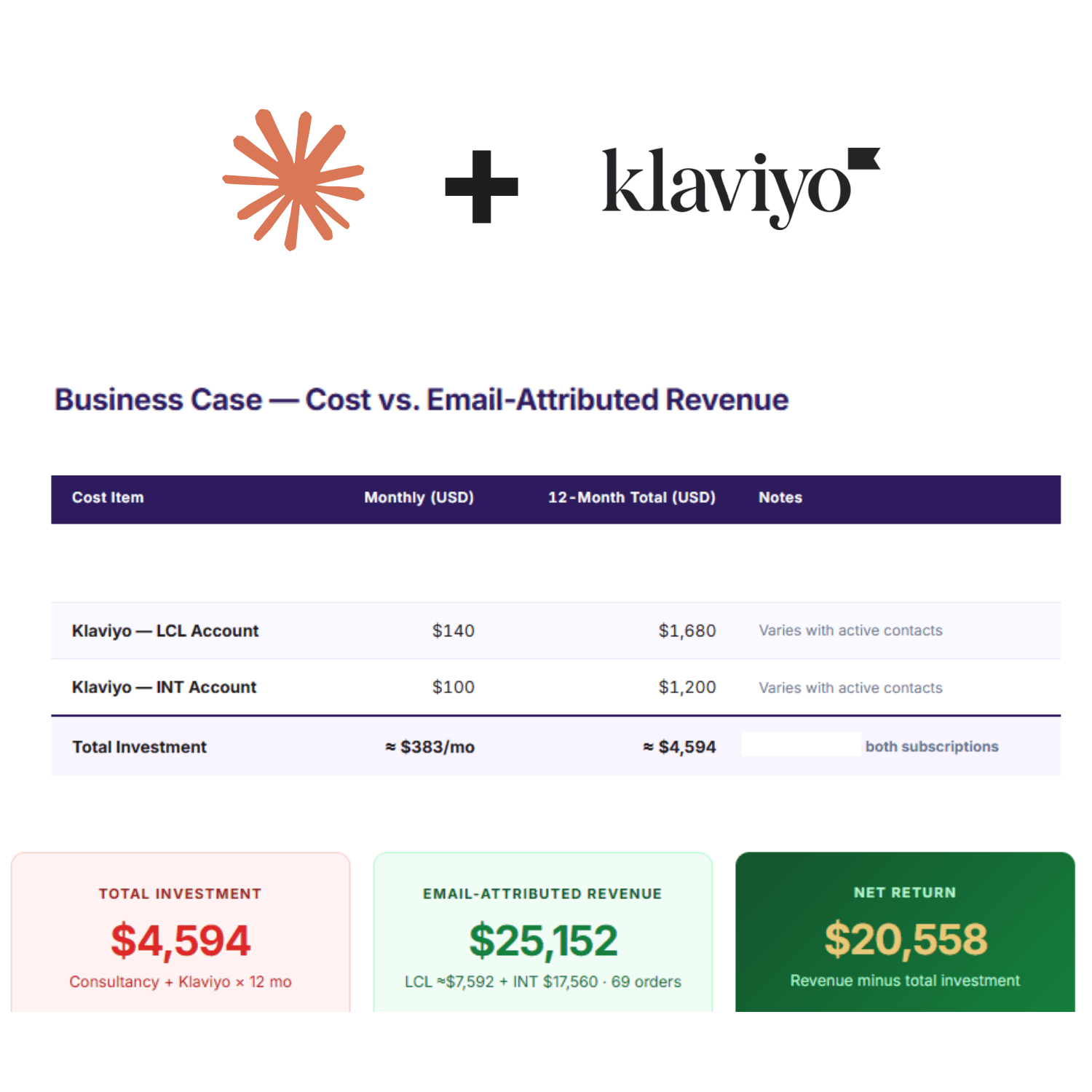
My friend went into that call with a clean, costed business case. No spreadsheets, no frantic exports, no piecing things together across tabs. The data was live, the numbers held up, and he kept the client.
A year ago that would have been a half-day job, minimum. This took under an hour, most of which was validation.
The setup that made it possible is below, and you can run the same thing on your own account.
What Is an MCP and Why Does It Matter?
MCP stands for Model Context Protocol. It's a standard that lets AI models like Claude connect directly to external tools and data sources. Think of it as giving Claude a live feed into your Klaviyo account rather than pasting screenshots or copying numbers manually.
Once it's set up, Claude can query your Klaviyo data in real time. Ask it a question, it fetches the answer. If you are still working out which parts of your marketing are worth wiring up to AI at all, we went through that question in what AI can realistically build for a UK small business.
Setting It Up (Takes About 5 Minutes)
The simplest way is through Claude's built-in connector. No API keys, no config files - it uses OAuth, so Klaviyo handles the authentication securely.
You'll need a Claude Pro, Max, Team, or Enterprise plan, and an Owner, Admin, or Manager role on your Klaviyo account.
In Claude, go to Settings > Connectors
Click Browse Connectors
Search for Klaviyo and click connect
Click Approve to grant Claude access
Review the Klaviyo permissions and click Allow
That's it. Claude now has live access to your Klaviyo account.
I checked these steps again in August 2026 and they worked as written. Claude's connector menus get renamed and moved fairly often, so if a label here doesn't match what's on your screen, look for the nearest equivalent under Settings rather than assuming the connector has gone.
If you manage multiple Klaviyo accounts, use the custom connector option instead. Go to Settings > Connectors > Add custom connector, set the name (e.g. "Klaviyo - Client Name") and use https://mcp.klaviyo.com/mcp as the remote MCP server URL. Repeat for each account.
What Claude Can Actually See
Once connected, Claude has access to:
Campaign performance - open rates, click rates, revenue attributed, send counts
Flow performance - each step in your automations, conversion data, revenue generated
Metrics - raw event data across channels and integrations
Profiles - subscriber data, segment membership
Lists and segments - who's in them, sizes
This isn't hypothetical. I can type "show me which flows generated the most revenue last month" and get an actual answer instead of spending 20 minutes clicking through dashboards.
What I Actually Use It For
Diagnosing underperforming flows
I had a client whose welcome sequence had a 4% click rate on email 2. I asked Claude: "Look at the welcome flow performance for the last 90 days - which email has the lowest click rate and what's the subject line?" Got the answer in 10 seconds. Previously that was a 10-minute process involving three different Klaviyo screens.
Writing performance reports
I pull a client's campaign data for the month, ask Claude to summarise the wins and losses, and get a first draft in my tone. Still needs editing, but the foundation is done in minutes rather than built from scratch. When the data sits in spreadsheets rather than a connected platform, the same job runs through the workflow in using Claude with Excel for client reports.
Spotting patterns across data
"Which segments have the highest revenue per recipient?" - this used to require building a custom report in Klaviyo. Now it's a single question in conversation.
What It Can't Do (Yet)
By default, the connector is read-and-write - Claude can query your data but also create campaigns and email templates if you ask it to. If you only want read access, you can set that in the custom connector settings. Either way, Claude won't do anything you don't explicitly ask it to.
It's also worth knowing that some tools involving user-generated content (like reading profile data) can expose that content to the model. Klaviyo flags which tools carry that risk in their docs, so worth reviewing if that's a concern for your use case.
Who This Is For
If you're a marketing manager, consultant, or agency owner who spends meaningful time each week interpreting Klaviyo data - set this up. The time saving is real. It won't replace your judgement on what to do with the data, but it removes the friction of retrieving it.
Set it up once, and your next Klaviyo deep dive takes a fraction of the time it used to.
Frequently Asked Questions
What is the Klaviyo MCP server?
The Klaviyo MCP server is an official integration that connects Claude directly to your Klaviyo account. Once set up, Claude can query live campaign data, flow performance, profiles, and revenue metrics in real time, without needing CSV exports.
Do I need a paid Claude plan to use Klaviyo MCP?
Yes. You need a Claude Pro, Max, Team, or Enterprise plan. The free tier does not support MCP connectors.
Can Claude write to my Klaviyo account, or is it read-only?
By default the connector is read-and-write. Claude can create campaigns and templates if you ask it to. For read-only access, use the custom connector option and restrict permissions there.
How long does it take to set up Klaviyo MCP with Claude?
About 5 minutes. You connect via OAuth through Claude's Settings > Connectors menu. No API keys or config files required.
Does Klaviyo MCP work with multiple accounts?
Yes. For multiple accounts, use the custom connector option and add each account separately with a distinct name and the MCP server URL: https://mcp.klaviyo.com/mcp.
Want someone to look at your actual numbers?
If your email programme has never been costed properly, or you suspect the revenue attributed to it wouldn't survive scrutiny, I'll go through the real figures with you: campaign and flow performance, what the programme costs to run, and what it returns. Send me the details and I'll tell you what I find.
About the author
Ejaz Ahmed founded AI Marketing Foundry after six years at WPP, Publicis and Crafted, running multi-million pound digital portfolios for global brands. He holds an MSc in Data Science and AI and works hands-on with UK SMEs on paid media, email and AI systems. AI Marketing Foundry is a trading name of SDF Ventures Ltd, registered in England and Wales, company number 16371887.